git-context-switcher 2.0: the right git identity in every repo

If you use more than one git identity (personal and work, a couple of clients, an open source handle), git-context-switcher makes sure each repo gets the right one. Right name, right email, right SSH key, right signing setup, without thinking about it.
Version 2.0 is out today. It's a ground-up rebuild on top of git's own conditional includes, so git does the matching and the tool stays out of the way.
npm install -g git-context-switcherIn thirty seconds
Tell it who you are where, then ask git who it thinks you are:
git-context add work --dir ~/work \
  --remote github.com/acme-example \
  --email ada@work.example.test \
  --ssh-key ~/.ssh/id_work --sign ssh -y

cd ~/work/site && git-context whoami
context work (~/.gitconfig.d/work.gitconfig)
name Ada Example (~/.gitconfig)
email ada@work.example.test (~/.gitconfig.d/work.gitconfig)
signing ssh (~/.gitconfig.d/work.gitconfig)
ssh ssh -i ~/.ssh/id_work -o IdentitiesOnly=yes (~/.gitconfig.d/work.gitconfig)Every value shows the file it came from. That's git's answer, not the tool's guess.
Prefer to be walked through it? git-context setup is an interactive wizard with starter templates for personal, work, client and open source contexts.
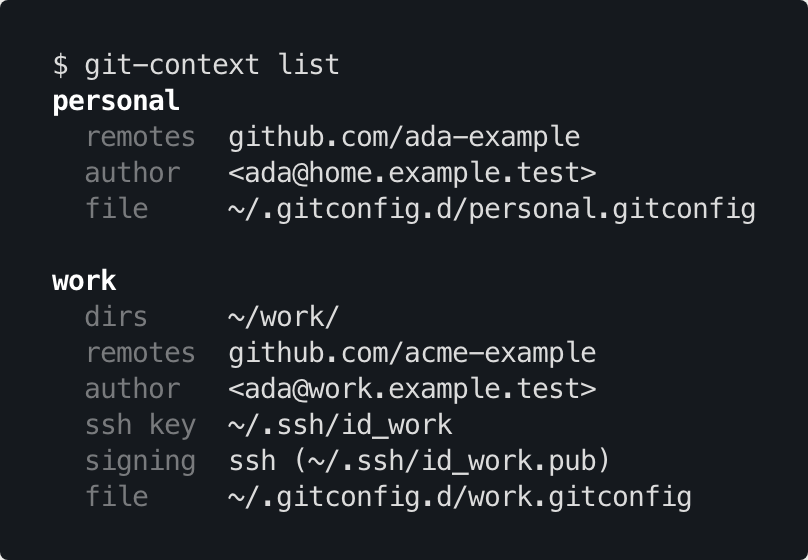
Match by folder, or by remote
--dir ~/work covers everything you keep in that folder. --remote github.com/acme-example covers every repo whose remote points there, wherever you happened to clone it: a scratch folder, /tmp, a new laptop. It understands https, ssh:// and git@host:org/repo URLs, and it's anchored to the host, so a look-alike URL on another domain doesn't match.
One SSH key per account
If you have two GitHub accounts, you've probably fought with ~/.ssh/config host aliases. Give a context --ssh-key instead, and pushes from those repos use that key and only that key. Clone URLs stay exactly as GitHub shows them.
Signed commits, per context
--sign ssh or --sign gpg turns on commit and tag signing for a context. For SSH signing, git-context also keeps an allowed-signers file up to date and points git at it, so git log --show-signature can verify your own commits locally.
The safety net
The rest of the tool is about catching mistakes before they're permanent.
git-context doctorchecks your setup for the ways it silently breaks. The classic one is a global[user]block that ends up below the includes and overrides every context. It also catches directory patterns missing their trailing slash, key files that don't exist, and two contexts claiming the same folder. It exits non-zero on problems, so it works in CI too.git-context guard onmakes git refuse to commit anywhere no context applies, instead of quietly falling back to your global email.guard offputs things back.git-context audit ~/srcscans a folder of repos for recent commits made with the wrong one of *your* emails. Other people's commits are ignored.
$ git commit --allow-empty -m test
fatal: no email was given and auto-detection is disabled
Git does the matching. The tool writes the config, checks it, and catches the mistakes.

It stays out of your way
- It only touches the includes it created, the ones pointing into
~/.gitconfig.d/. Anything you wrote by hand is left alone. - Your gitconfig is backed up before every change.
- Every command runs non-interactively with flags, and
list,whoami,doctorandaudittake--json. It's easy to script into dotfiles. exportandimportmove your contexts to a new machine as a JSON file.- It's tested on macOS and Linux against real git, not mocks.
Note
Needs Node 22.13 or newer. Matching by remote needs git 2.36 or newer; matching by folder works on older versions.
Upgrading from 1.x
Just install 2.0 and run any command. Your existing contexts migrate automatically, including directory patterns 1.x never actually applied, and your old settings file is kept as a backup.
The story behind 2.0
This release came out of auditing my own tool and finding it was deleting git config it didn't own. I wrote up what I found and why the fix was to make the tool smaller: I audited my own git tool and found it deleting people's config.
Get it
npm install -g git-context-switcher
git-context setup
The source, docs and changelog are on GitHub, and the package is on npm. Issues and ideas are welcome.